How to Use XNPV Function in Excel
The XNPV Function in Excel returns the net present value (NPV) of an investment with cash flows occurring at irregular intervals.

The XNPV Function in Excel returns the net present value (NPV) of an investment with cash flows occurring at irregular intervals.
The XNPV function in Excel is a built-in feature that returns the net present value (NPV) of an investment given a series of cash flows and the specific dates on which the cash flows occur.
The net present value (NPV) is a fundamental concept in corporate finance most often used to guide capital budgeting decisions.
Simply put, the net present value (NPV) of a potential investment, such as a potential project to pursue, is the net difference between the present value (PV) of future cash inflows and outflows.
The present value (PV) of each future cash flow is a function of the discount rate and the date on which the cash flow occurs.
The difference between the XNPV and NPV function in Excel is as follows.
The formula to use the XNPV function in Excel is as follows.
The array of values and dates must be equal in length since the purpose of the dates array is to identify the timing of each given cash flow.
The dates entered must be formatted properly, as well as valid dates, or else an error message appears.
We’ll now move on to a modeling exercise, which you can access by filling out the form below.


Suppose you're tasked with calculating the net present value (NPV) of a project that costs $1 million in order to decide whether to accept or reject the investment.
If the project is accepted, the initial investment required is $1 million on 12/31/22.
After the initial outlay, the anticipated income generated from the project and the corresponding dates are as follows.
The only remaining input is the discount rate, i.e. the minimum rate of return required for the investment to be accepted, which we'll assume is 10%.
Once the project's cash inflows / (outflows) are entered into our spreadsheet, we'll use the XNPV function to calculate the net present value (NPV) of the investment.
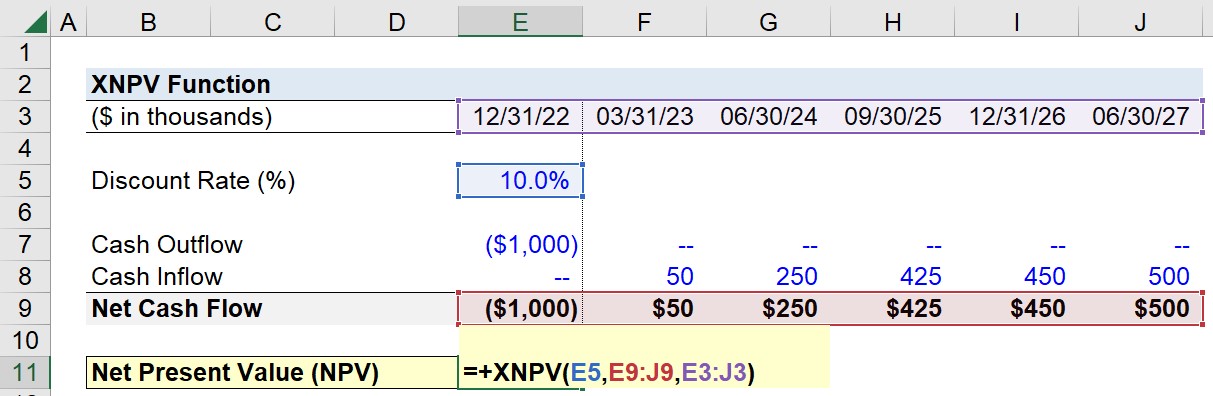
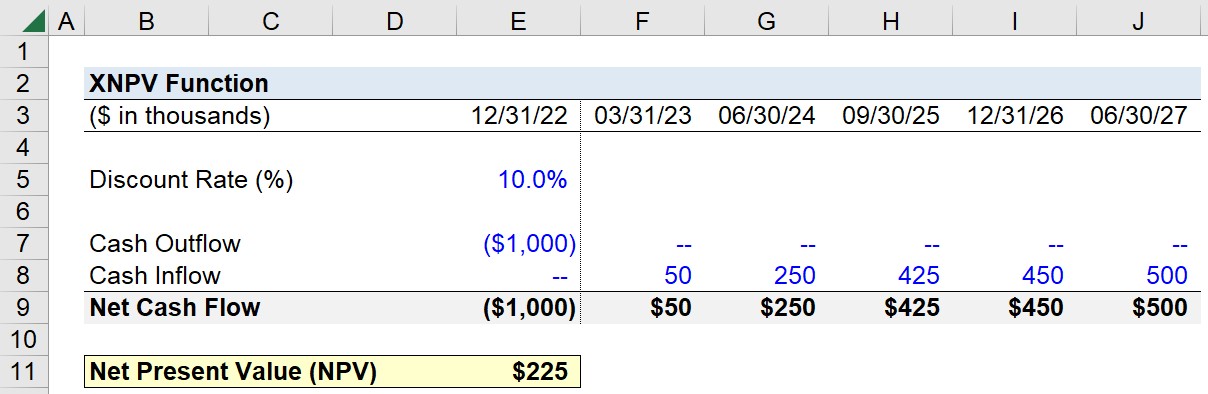
Upon entering our assumptions into the XNPV formula, we arrive at a net present value (NPV) of $225,000.
The implied net present value (NPV) determined using the XNPV function in Excel is positive, so the corporation is far more likely to accept the project since it is anticipated to be profitable (and create positive economic value).




No comments yet.