What is the Excel IFERROR Function?
The IFERROR Function in Excel is a built-in feature that returns a pre-determined value in the case of a calculation error, rather than an error message.

The IFERROR Function in Excel is a built-in feature that returns a pre-determined value in the case of a calculation error, rather than an error message.
The Excel IFERROR function is utilized to identify and prevent error messages from appearing in a spreadsheet.
Using the IFERROR function is one method to ensure that errors within a financial model are brought to the attention of the user with a custom value.
Some of the most common error messages that trigger the “IFERROR” function are the following types:
In practice, the most common custom returned value is “NA”, “N/A” or “n.a.”, which refers to the phrase “not applicable”.
The general rule of thumb is that the returned value should be in the form of text, as opposed to a number.
For example, if the returned value is the number “0”, a mistake could easily be made where the cell containing the error is included in a calculation with an actual numerical value.
The formula for using the IFERROR function in Excel is as follows.
If there is no error, the calculation in the first input is performed as normal, otherwise, the error message is shown (and the error is “trapped”).
We’ll now move on to a modeling exercise, which you can access by filling out the form below.


Suppose we’re in the initial stages of building an income statement forecast.
The financials for the company—from revenue (the "top line") to the gross profit line item—are as follows.
| Income Statement | 2021A | 2022E | 2023E |
|---|---|---|---|
| Revenue | $80 million | $100 million | $120 million |
| Less: COGS | ($85 million) | ($85 million) | ($85 million) |
| Gross Profit | ($5 million) | $10 million | $20 million |
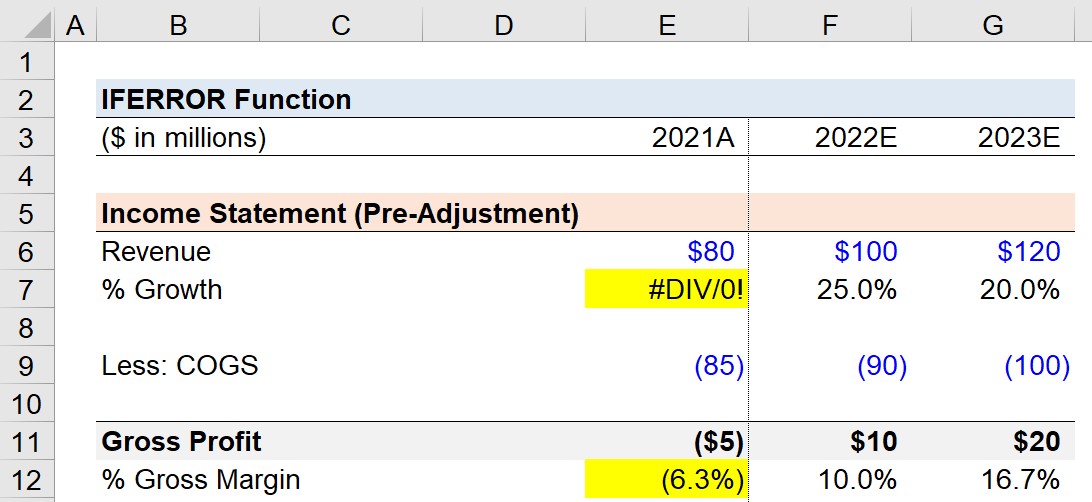
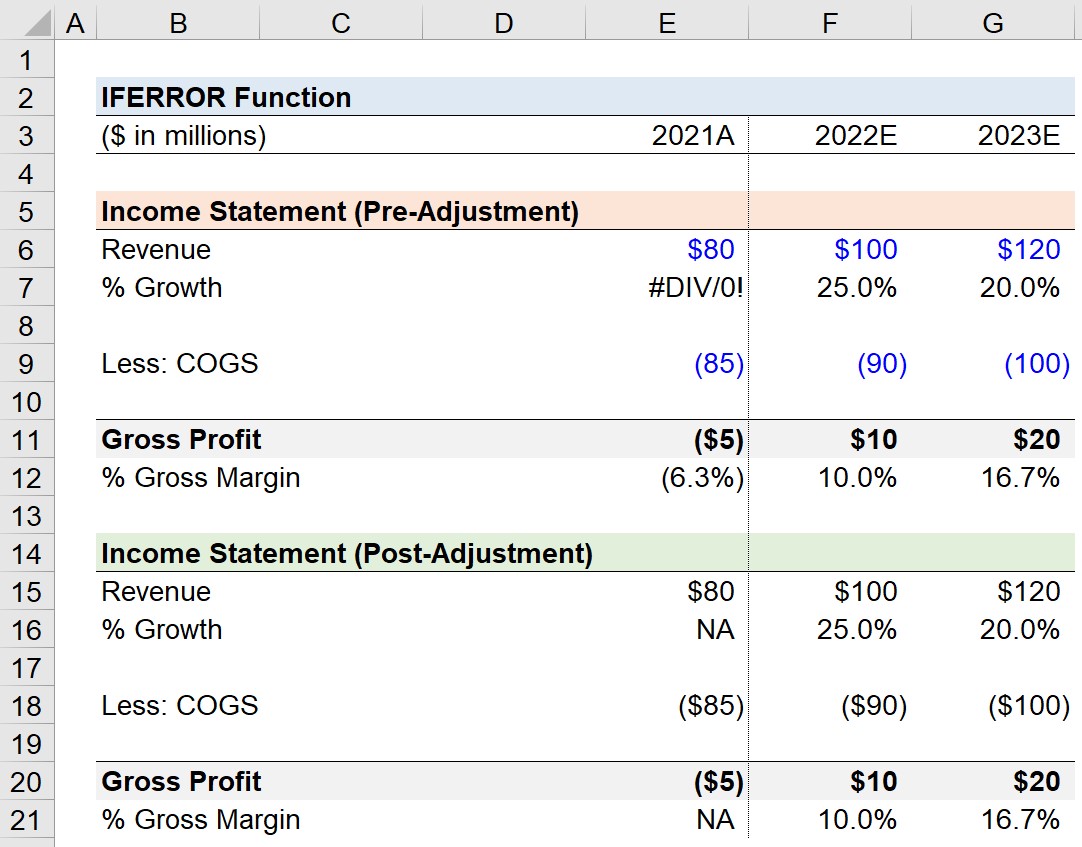
In the next step, we’ve added a line item to calculate the year-over-year growth rate (YoY) of the company’s revenue.
We’ll calculate the YoY growth rate by taking the current year revenue, dividing it by the prior year revenue, and subtracting one from the result.
However, there is no historical data for Year 0 (2021A), so an “#DIV/0!” error message appears.
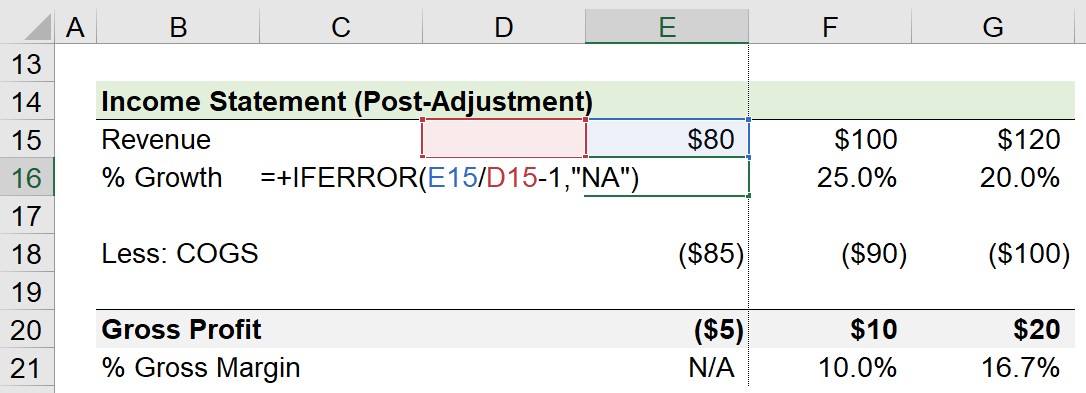
In order to prevent our model from showing the error message, we’ll wrap our YoY growth formula with the following “IFERROR” function.
In the final part of our quick lesson, we’ll show an example of an error that is not necessarily an “error”, per se, to Excel.
Here, we’ve calculated the gross profit for each period, so we can determine the gross margin by dividing the gross profit by the revenue in the corresponding year.
The outlier is Year 0 (2021A), since the gross margin is a negative figure, which is clearly an “error” yet Excel would not recognize it as such.
Therefore, we’ll enter the following formula to handle the error manually.
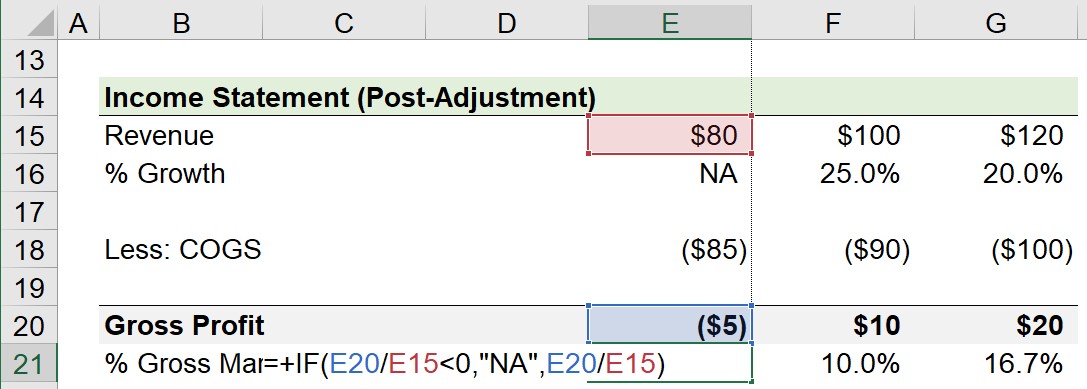
The formula states that if the gross margin is less than zero, then return the “NA” error message.
If the gross margin is greater than zero, however, the calculated gross margin should be returned as usual, as performed in the next two periods.
In cases such as the example shown here, “NM” or “N/M” can be used as the returned error message, which refers to the phrase “not meaningful”.
For the most part, ensuring there are no calculations that are unreasonable (or not plausible) in a model results in a cleaner, more intuitive financial model.
Other instances where these issues can require a manual entry “IF” function to catch an error would be in the following scenarios:



No comments yet.