Exit to Learning Dashboard

Loan Amortization Schedule

Step-by-Step Guide to Understanding Loan Amortization Schedule in Excel

Jul. 19, 2026
6m Read
Matan Feldman
Written ByMatan Feldman
UpdatedJul. 19, 2026
Read Time6m

What is Loan Amortization?

The Loan Amortization Schedule outlines the interest expense obligation and principal payments owed on a loan, such as a mortgage, including the outstanding balance of the financing.


Loan Amortization Schedule Calculator Excel Template
Generate Key Takeaways

How to Calculate Loan Amortization

The loan amortization schedule describes the allocation of interest payments and principal repayment across the maturity of the loan.

The borrower is required to fulfill payment obligations per the schedule laid out in the contractual agreement with the lender as part of the financing arrangement.

In particular, there are two forms of payment associated with loans: 1) the interest expense and 2) the principal amortization.

  • Interest Expense ➝ The interest component reflects the cost of the borrowing, i.e. the credit risk associated with providing debt to the borrower is factored into the interest rate by the lender.
  • Principal Amortization ➝ The principal payments, on the other hand, represents the gradual repayment of the original principal over the maturity term.

Over the length of the borrowing term, the loan’s book value gradually reduces in value until the outstanding balance reaches zero on the date of maturity.

If the loan principal balance does in fact reach zero, the borrower met its mandatory debt obligations on time and managed to not default, i.e. did not miss an interest or principal payment.

What is Fixed-Rate Amortization Schedule?

The amount of interest owed each period declines in proportion to the amount of principal repaid, despite the fixed interest rate, so the interest owed declines as more of the loan’s principal is recouped by the lender.

While the interest paid each period is in fact a function of the outstanding principal balance, interest payments do NOT reduce the principal.

Therefore, the capital at risk—the money that could be lost in the event of default—is the loan principal itself. The lender is risking losing the original loan under the belief that the borrower can meet the interest requirements and return the principal in full by maturity.

In a fixed-rate amortization schedule, which tends to be the standard among mortgage financing loans, the repayment of the loan is completed in equal installment payments.

The value of the principal and the interest payments, however, will be different between each payment period.

Starting off, a higher proportion of the total payment will go towards servicing interest. But over the course of the borrowing term, the percentage attributable to principal payments increases (and the interest payments decline).

Continue Reading Below
The Wharton Online and Wall Street Prep Real Estate Investing & Analysis Certificate Program

Level up your real estate investing career. Enrollment is open for the upcoming Wharton Certificate Program cohort.

Enroll Today

Loan Amortization Formula

In order to create a loan amortization schedule in Excel, we can utilize the following built-in functions:

1. Excel PMT Function (Principal + Interest)

The PMT function in Excel determines the total payment owed each period—inclusive of the interest and principal payment. The total payment, unlike the other two components, will remain constant over the entire borrowing term.

=PMT(rate, nper,pv,[fv],[type])

2. Excel PPMT Function (Principal)

The PPMT function in Excel calculates the periodic principal amortization owed on the loan, which, to reiterate from earlier, should increase after each payment period.

=PPMT(rate, per, nper, pv, [fv], [type])

3. Excel IPMT Function (Interest)

The Excel PMT function calculates the interest portion of each periodic payment. Contrary to the principal payments, the interest payments should decline following each payment period.

=IPMT(rate,nper,pv,[fv],[type])

Amortization Schedule Calculator — Excel Template

We’ll now move on to a modeling exercise, which you can access by filling out the form below.

Excel Template IconDownload Icon

Excel Template | File Download Form

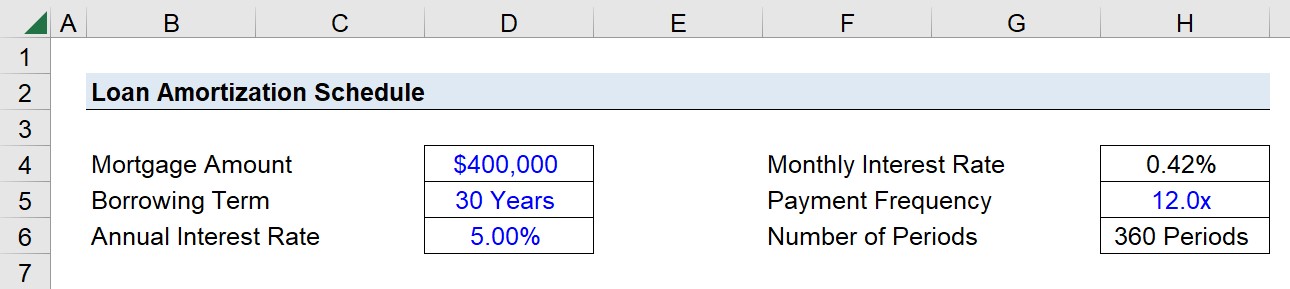
1. Mortgage Loan Financing Assumptions

Suppose you’re tasked with creating a loan amortization schedule on behalf of a consumer that decided to take out a 30-year fixed-rate, fully amortizing loan.

The mortgage loan amounts to $400,000 with an annual interest rate of 5.00% and monthly compounding.

  • Mortgage Loan = $400,000
  • Borrowing Term = 30 Years
  • Annual Interest Rate (%) = 5.00%
  • Payment Frequency = 12x

Our first step is to convert the annual interest rate into a monthly interest rate by dividing it by 12, which leaves us with a monthly interest rate of 0.42%.

  • Monthly Interest Rate (%) = 5.00% ÷ 12 = 0.42%

Since the borrowing term is denoted in years, we’ll also adjust that input to be expressed on a monthly basis by multiplying it by twelve.

  • Number of Periods = 30 Years x 12 = 360 Periods (i.e. months)

The total number of compounding periods is thereby 360 periods.
Loan Amortization Schedule Calculation Example

2. Build Loan Amortization Schedule in Excel

With our inputs converted into the right units, we’re now ready to build our mortgage amortization table in Excel.

  • Month → In the first column, we’ll enter the first month number, add one to it in the column below, and then drag the formula down until we reach our total number of periods (360).
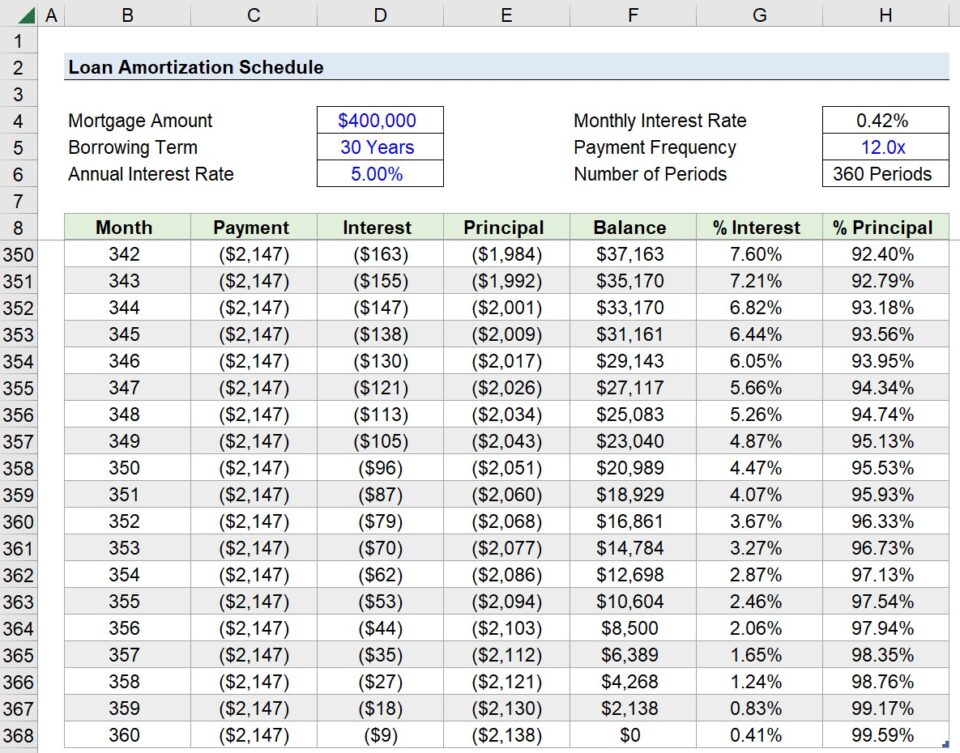
  • Payment → The next column contains the total periodic payment for each period. Hence, the amount remains fixed for the entirety of the borrowing term. Using the PMT function, we can determine that each installment payment will total $2,147.
  • Interest → The interest column is calculated using the IPMT function. As mentioned earlier, the interest should initially contribute a greater proportion in the earlier periods, but gradually reduce in value as more of the principal is paid off.
  • Principal → The principal payment utilizes the PPMT function. As more payments are made, the principal amortization starts to pick up while the interest payments reduce in value. Note that only the principal amortization reduces the outstanding balance on the loan, i.e. the column to the right.
  • Balance → For Month 1, we first link to our original loan principal ($400k) and deduct the first principal payment, which is $481. We cannot drag the formula down from here. Instead, the cell below links to the Month 1 balance ($399.5k) and subtracts the principal payment in the matching period. After doing so, we can fill the remaining cells below and must confirm that the outstanding balance in the final period is zero.

The formula of each Excel function used in each column is as follows.

=PMT(0.42%, 360, $400k)
=IPMT(0.42%, Month Number, 360, $400k)
=PPMT(0.42%, Month Number, 360, $400k)

Except for the month number, all other inputs must be an absolute reference, i.e. anchored by clicking “F4” once.

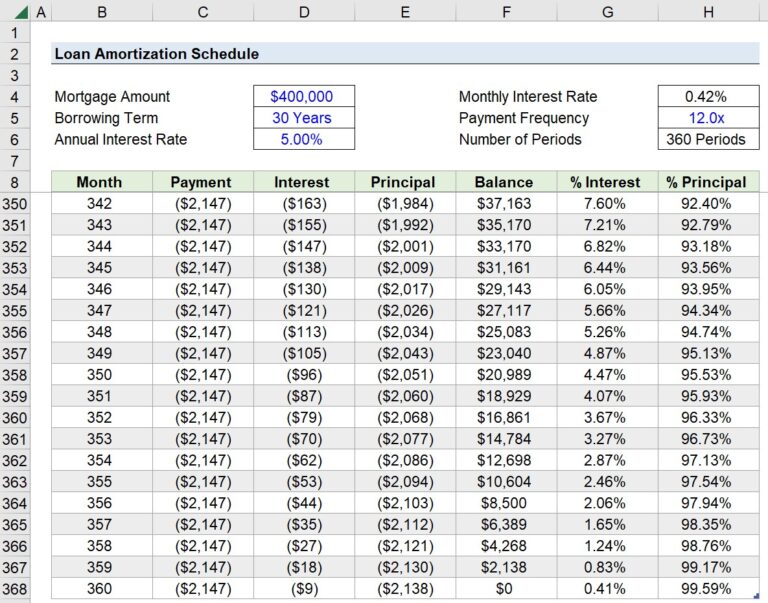
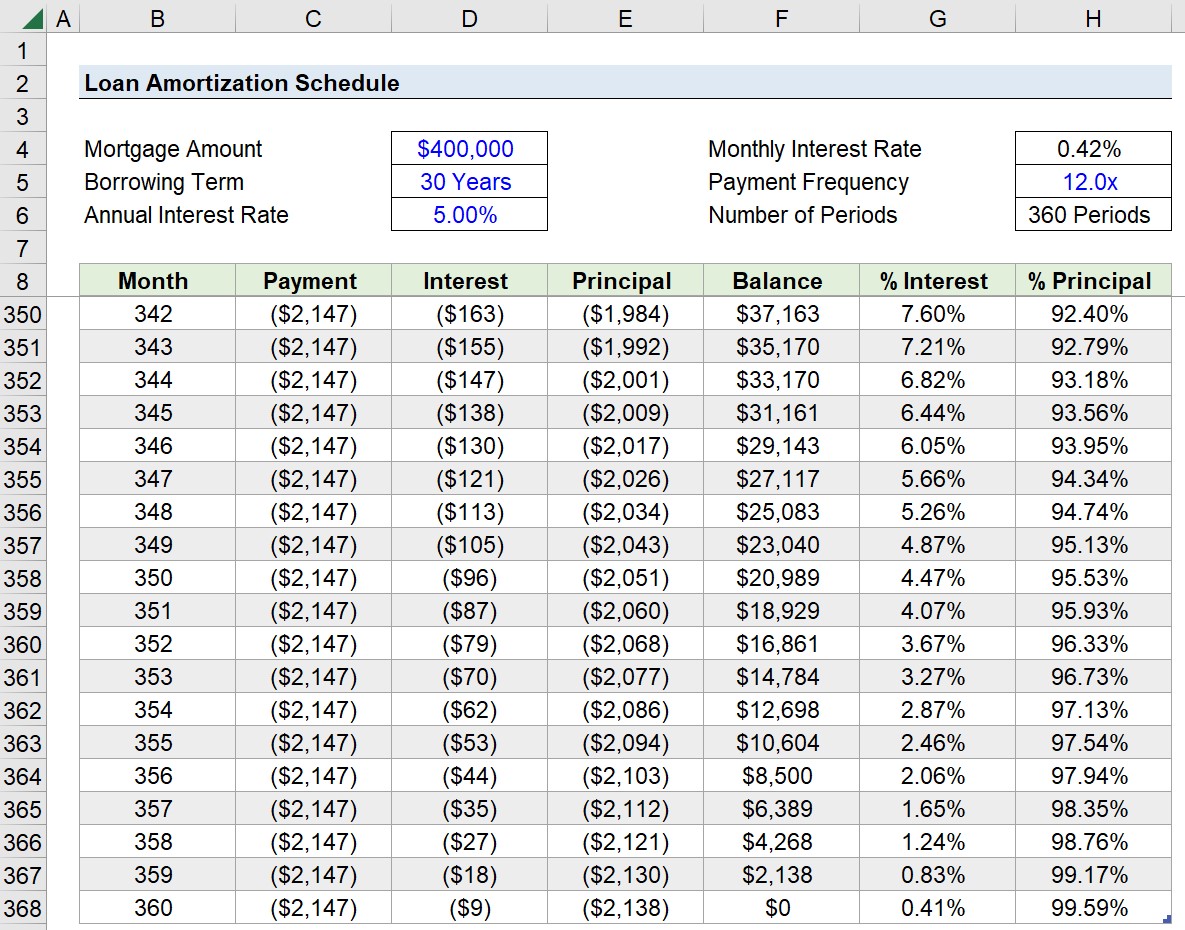
While an optional step, we’ve also added two more columns to the right (Columns "G" and "H") to visually observe the percentage change in the interest and principal payment contribution over the course of the borrowing term.

In Month 1, the interest-principal split was 77.65% and 22.38%, but by Month 360, it shifts to 0.41% and 99.59%, as shown below.
Amortization Schedule Calculator

As a quick sanity check, we must confirm two items on our table to ensure there are no mistakes in our amortization schedule.

  1. Interest (Column D) + Principal (Column E) = Payment (Column C)
  2. Total Principal (Sum of Column E) = $400,000

3. Loan Amortization Table Example

In closing, we can calculate the sum of each component to determine the total mortgage repayment amounts, and we arrive at the following figures:
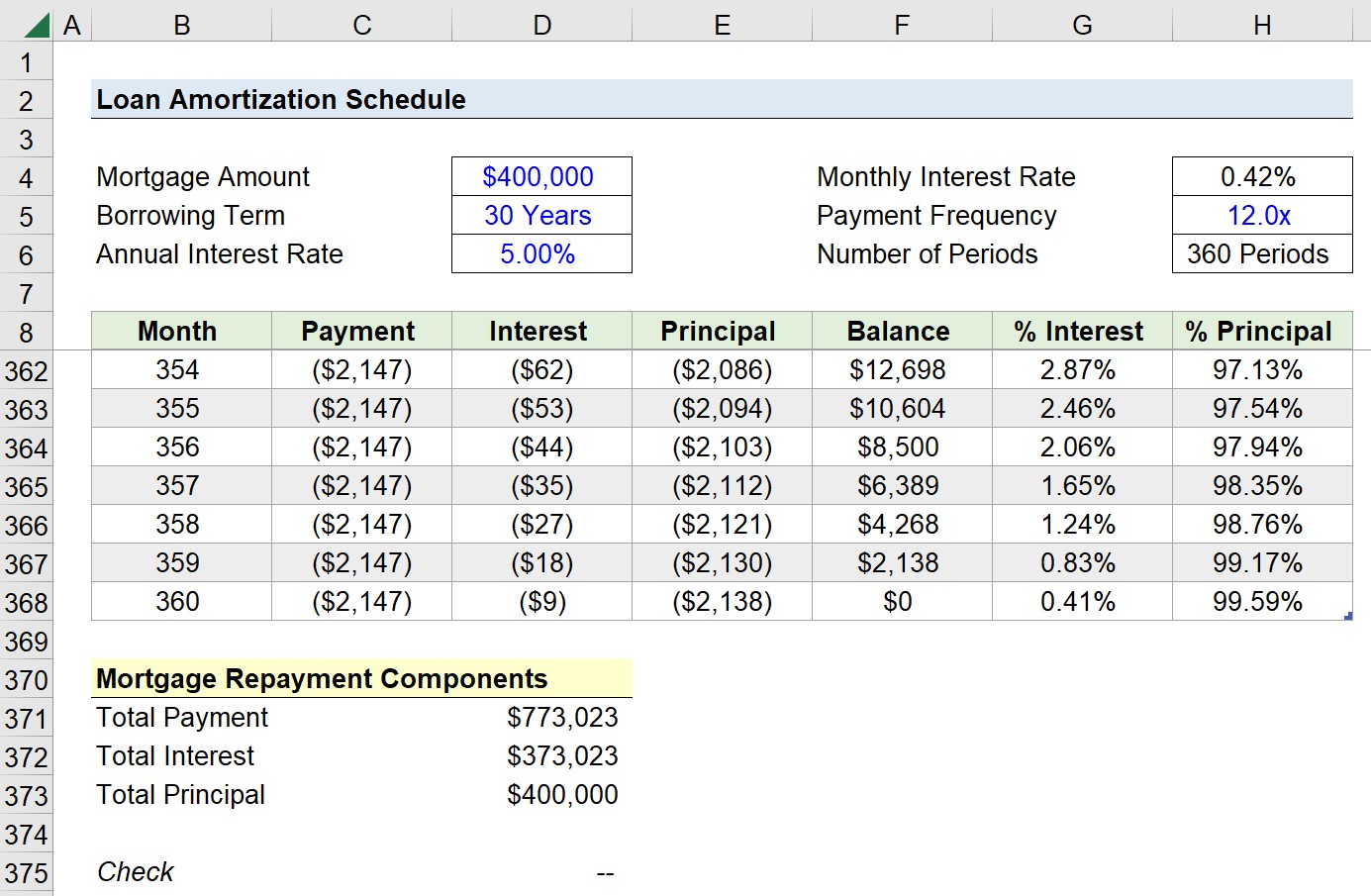
  • Total Payment = $773,023
  • Total Interest = $373,023
  • Total Principal = $400,000
Mortgage Loan Amortization Schedule in Excel
Frequently Asked Questions
What happens if you make extra principal payments on an amortizing loan?
Extra principal payments go directly toward reducing the outstanding loan balance rather than future interest, which shortens the loan's remaining life and lowers the total interest paid over time. Because interest is calculated on the current outstanding balance each period, even a modest extra payment early in the loan can save a meaningful amount over the full term, since it reduces the balance that interest accrues on for every remaining payment.
What is negative amortization, and how does it happen?
Negative amortization occurs when a loan's required payment is smaller than the interest accruing each period, causing the unpaid interest to get added to the principal balance instead of paid off. This means the loan balance actually grows over time rather than shrinking, which can happen with certain adjustable-rate mortgages or loans that offer a minimum payment option below the interest owed. It's generally considered risky for borrowers, since it can lead to owing more than the original loan amount.
What's the difference between an amortizing loan and an interest-only loan?
An amortizing loan requires each payment to include both interest and a portion of the principal, so the balance steadily decreases until it reaches zero by maturity. An interest-only loan only requires the interest portion to be paid for a set period, meaning the principal balance stays exactly the same until either the interest-only period ends or the loan matures, at which point a large lump-sum principal payment or a jump to higher amortizing payments is typically required.
How does refinancing affect a loan's amortization schedule?
Refinancing replaces the existing loan with a new one, which resets the amortization schedule entirely based on the new principal balance, interest rate, and term length. Even if the new interest rate is lower, refinancing into a fresh 30-year term after already paying down several years of the original loan can mean paying more in total interest over time, simply because the amortization clock starts over from the beginning.
What is a balloon payment, and how does it affect amortization?
A balloon payment is a large lump-sum amount due at the end of a loan term that hasn't been fully amortized, meaning the regular payments only pay down part of the principal rather than the entire balance. This structure is common in certain commercial real estate and short-term financing arrangements, and it requires the borrower to either pay off the remaining balance in full, refinance, or sell the underlying asset when the balloon payment comes due.
How does a debt service coverage ratio (DSCR) relate to a loan's amortization schedule?
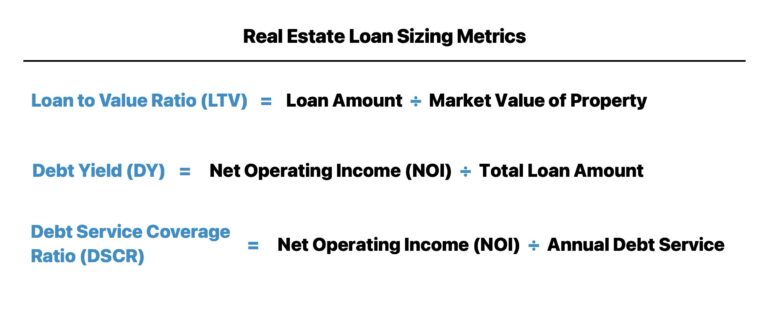
The debt service coverage ratio measures how many times over a borrower's operating cash flow covers its total debt service, meaning the sum of principal and interest payments pulled directly from the amortization schedule for that period. Lenders use this ratio to size how much debt a borrower can support and to set the amortization terms themselves, since a longer amortization period lowers the annual payment amount and improves the DSCR, giving lenders a lever to adjust risk without changing the loan amount or interest rate.
How does a prepayment penalty affect a loan's amortization schedule?
A prepayment penalty is a fee charged if a borrower pays down principal faster than the scheduled amortization, which is designed to protect the lender's expected interest income over the life of the loan. This means a borrower can't always assume that making extra payments will simply accelerate payoff and reduce interest at no cost, since the penalty needs to be weighed against the interest savings to determine whether early repayment actually makes financial sense on that specific loan.
How does the mandatory amortization percentage differ between a Term Loan A and a Term Loan B?
A Term Loan A typically requires meaningful mandatory amortization, often 5% to 10% of the principal paid down each year, and is usually held by commercial banks that prioritize steady repayment. A Term Loan B, by contrast, generally carries minimal mandatory amortization, often just 1% per year, with most of the principal due as a bullet payment at maturity, reflecting its structure as debt held by institutional investors who are comfortable with more back-loaded repayment in exchange for a higher interest rate.
How does an adjustable-rate mortgage's amortization schedule differ from a fixed-rate one?
A fixed-rate amortization schedule is entirely predictable from day one, since the interest rate and payment amount never change over the life of the loan. An adjustable-rate mortgage, by contrast, has a schedule that shifts whenever the rate resets, which means the interest and principal split, and sometimes the total payment amount itself, can change at each adjustment period, making the full amortization table impossible to know in advance beyond the initial fixed-rate window.
Why does the total interest paid change so much if you shorten a loan term?
Shortening a loan term, such as choosing a 15-year mortgage over a 30-year one, dramatically reduces total interest paid because the balance gets paid down much faster, leaving less time for interest to accrue on the outstanding amount. Even though the monthly payment is higher on a shorter-term loan, a much larger share of each payment goes toward principal from the very beginning, which is why total interest costs can differ by well over 50% between the two terms on an identical loan amount.
Comments

No comments yet.